


HOT SALE🔥 Lovyanocosh® Ultra Recovery Converter ✨
HOT SALE🔥 Lovyanocosh® Ultra Recovery Converter ✨
🌿 Instantly Recover Data: Easily scan and retrieve lost photos, videos, and documents with zero effort.
🛡️ Safe & Zero-Damage: 100% secure processing ensures zero damage to original files across multiple formats.
🧼 One-Click Smart Restore: Intelligent automatic recognition simplifies complex steps to save your time.
💧 Plug & Play Simplicity: Highly compatible with multiple devices—simple interface, no complex setup.
♻️ Built to Last: Powerful, stable core program engineered for long-term and repeated high-performance use.
BUNDLE & SAVE
Couldn't load pickup availability

HOT SALE🔥 Lovyanocosh® Ultra Recovery Converter ✨
What Makes Zilkee the Ultimate Data Recovery Tool?
What Makes Zilkee the Ultimate Data Recovery Tool?
- It retrieves data from old hard drives that have become inaccessible due to a faulty laptop or computer.
- It allows access to three hard drives at once for effortless file backup or transfer.
- It supports a wide range of hard and solid state drives: 2.5 and 3.5 inch SATA / 2.5 and 3.5 inch IDE / DVD ROM / CD ROM / DVD RW / CD RW / DVD+RW Optical and Blu-Ray Drives.
- It has diverse operating system compatibility. Use it with Windows 11 / 10 / 8.1 / 8 / 7 / 2000 / XP / Vista, Mac OS and Linux.
How Do I Use the Zilkee Recovery Converter?
How Do I Use the Zilkee Recovery Converter?
Step 1: Connect the 12V 2A power cord to the recovery converter and plug the other end into the wall.
Step 2: Connect the hard drive that holds your data to the corresponding 2.5 inch or 3.5 inch port on the recovery converter.
Step 3: Connect one end of the USB 3.0 cable to the recovery converter and the other end to your working computer or laptop.
Step 4: Turn the power switch on your recovery converter to ON.
Step 5: Open the file explorer on Windows or the finder on Mac. You'll see the hard drive is now mounted and can access your old files.
Step 6: Copy / paste the old files from your hard drive and move them to your new computer.
What is Zilkee's Fulfillment Promise?
What is Zilkee's Fulfillment Promise?
- 48 Hours MAX Processing time
- USA Standard Shipping in 5 - 7 Days
- USA Express Shipping in 2 - 5 Days
- International Standard Shipping in 8 - 15 Days
Does the Ultra Recovery Converter Work with Corrupt Drives?
Does the Ultra Recovery Converter Work with Corrupt Drives?
Unfortunately, the ultra recovery converter needs hard drives to be in working condition to read them.
Does the Ultra Recovery Converter Work with Macbook Drives?
Does the Ultra Recovery Converter Work with Macbook Drives?
Yes! The converter allows you to transfer files from any Windows / Mac / Chrome / Linux operating system. Whether you have an old Mac and are transferring to a new Windows OS, or you have an old Linux OS and are transferring to a new Macbook OS.
Can I Extract files from an old password protected computer?
Can I Extract files from an old password protected computer?
Yes you can. Passwords only protect the computer, not the hard drive.
Can I get customer support?
Can I get customer support?
Yes! We pride ourselves on world class customer support to help walk you through the process or troubleshoot issues. This includes live tech support via phone or email.
Do you accept returns and provide refunds?
Do you accept returns and provide refunds?
We offer a 90 day satisfaction guarantee. If the product does not work for you simply contact customer support for troubleshooting. If troubleshooting is unsuccessful we'll immediately process a return for you and refund.
Will the converter still be able to transfer files from my 10 year old dusty computer?
Will the converter still be able to transfer files from my 10 year old dusty computer?
As long as the hard drive itself is in good working condition, with no damage to it, you'll be able to extract your files easily. The computer does not need to work for the converter to retrieve your files.


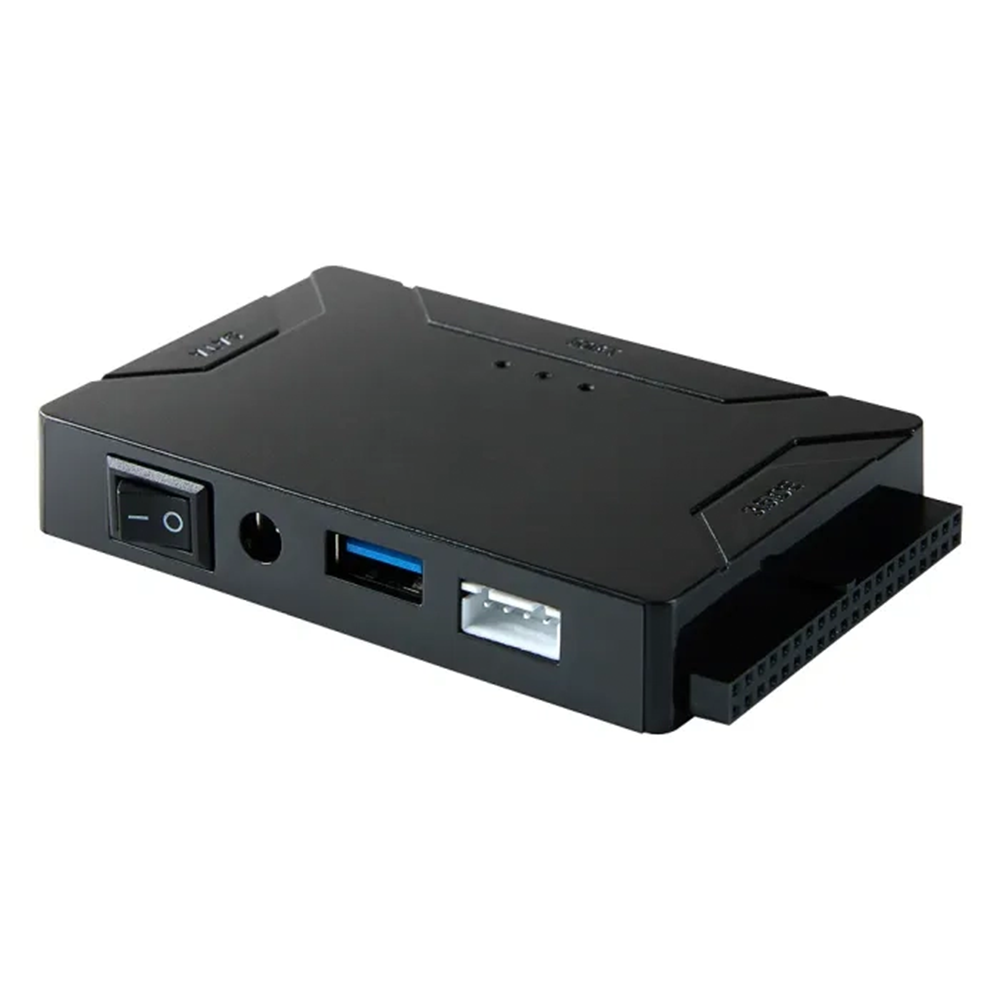

Retrieve all your data in just seconds!
Supports Various Hard Drives
2.5"/3.5" SATA HDD and SSD; 2.5"/3.5" IDE HDD, DVD-ROM, CD-ROM, CD-RW, DVD-RW, DVD + RW Optical, Blu-ray Drive through USB.
USB 3.0 Interface
Data transfer rates can go up to 5 Gbps supporting 6TB of capacity. Backward compatible with USB 2.0
Plug and Play
Does not require any drivers. Supports hot-swap, ON/OFF switch for HDD protection.
Compatibility
Our converter is compatible with Windows 11/10/ 8.1/ 8/ 7/Vista/XP, Mac IOS, and Linux.
You may also like
-
Lovyanocosh® 3-in-1 Glass Cleaning Paste ✨
Regular price From $23.96Regular price From $23.96 Sale priceUnit price per$31.9625% -
🚗LAST DAY 50% OFF ✨Lovyanocosh® Powerful High-Pressure Home Car Wash & Garden Sprayer
Regular price From $26.99Regular price From $26.99 Sale priceUnit price per$53.9850% -
Lovyanocosh® 3-in-1 Kitchen Faucet Organizer Rack
Regular price From $21.96Regular price From $21.96 Sale priceUnit price per$24.9912%


